 Aleksander Roszig
September 27, 2026 | 6 min Read
Aleksander Roszig
September 27, 2026 | 6 min ReadIAM PassRole in AWS: Why iam:PassRole Is the Most Dangerous Permission
Table of contents
When we audit AWS accounts, the most interesting findings are rarely the obvious ones like a public S3 bucket or an access key committed to Git. The findings that change the risk profile of a whole account are usually hidden in one line of an IAM policy. One of the lines that is catching an eye is "Action": "iam:PassRole", "Resource": "*".
iam:PassRole looks harmless. It does not create anything, it does not read data, and it doesn’t even appear as a separate event in CloudTrail, but it can turn a “limited” developer or CI/CD role into an account administrator.
In this article I explain what iam:PassRole actually does, why it is so often part of privilege escalation paths in AWS, and how to restrict it with least-privilege policies, conditions, and organization-level guardrails.
What Is iam:PassRole?
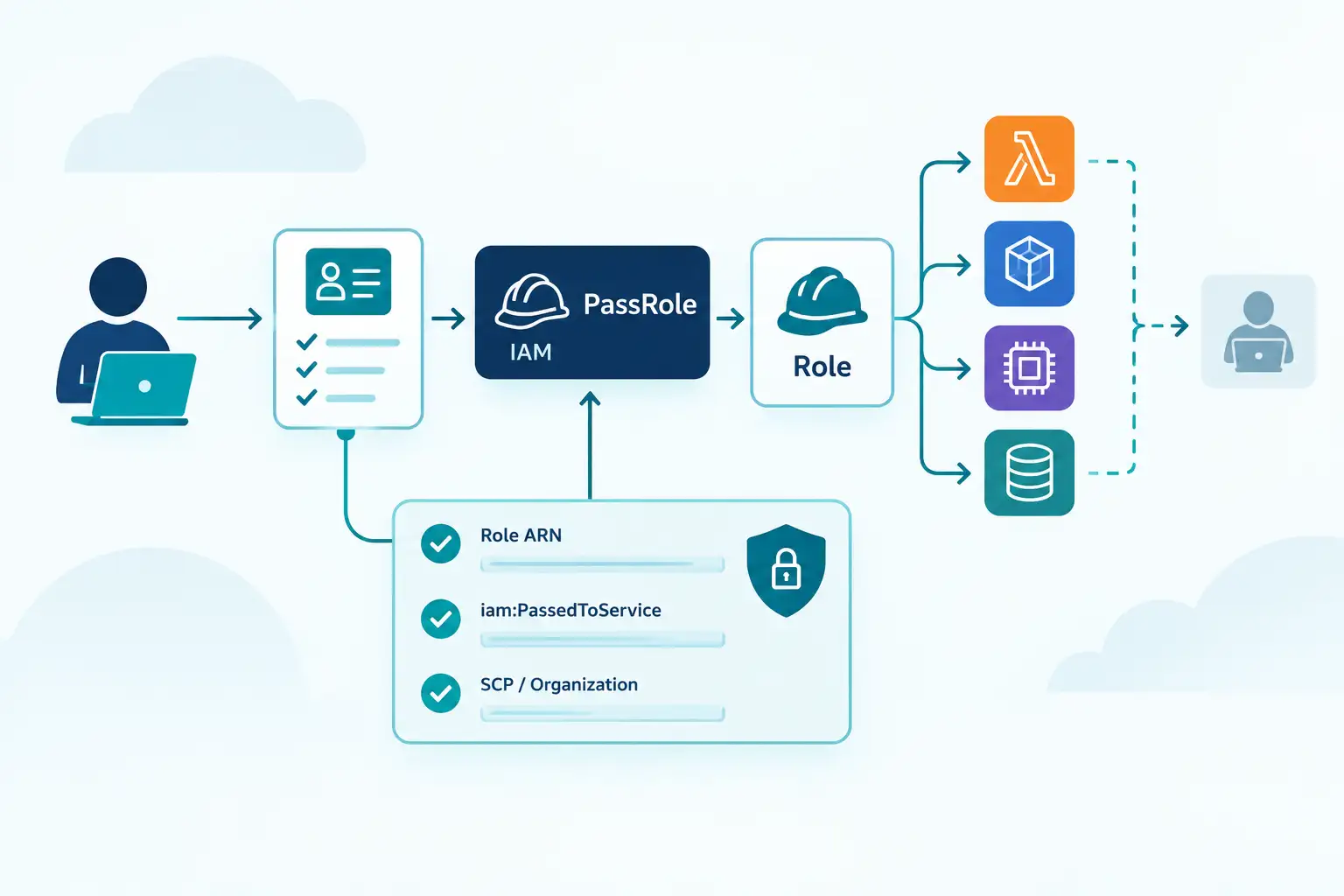
To configure many services, you must pass an IAM role to the service. This allows the service to assume the role later and perform actions on your behalf. A Lambda function writes to DynamoDB, an EC2 instance reads from S3, an ECS task pulls secrets from Secrets Manager. They do it by assuming an IAM role that you attach when you create or update the resource:
- Lambda – the execution role,
- EC2 – the role inside an instance profile,
- ECS – the task role and task execution role,
- SageMaker, Step Functions and many others – a service role.
To attach a role to such a resource, the actor needs permission to call the service API (for example lambda:CreateFunction) and permission iam:PassRole on that role. PassRole is AWS’s answer to the question: “Is this principal allowed to give this role to a service?”
Without iam:PassRole, the actor can create the resource but cannot attach a role to it. This is a common privilege escalation path in AWS, because iam:PassRole is often part of the permissions required to create resources.
For example with having permission to "lambda:*" but without iam:PassRole, the actor can create a Lambda function but cannot attach a role to it so in web UI you will get:
"User: arn:aws:iam::123456789:user1 is not authorized to perform: iam:PassRole on resource: arn:aws:iam::123456789:role/service-role/test-role-xxx with an explicit deny ..."
A minimal working example: a developer who can create Lambda functions using only dedicated execution roles.
{
  "Version": "2012-10-17",
  "Statement": [
    {
      "Sid": "CreateFunctions",
      "Effect": "Allow",
      "Action": ["lambda:CreateFunction", "lambda:UpdateFunctionConfiguration"],
      "Resource": "arn:aws:lambda:eu-central-1:123456789:function:app-*"
    },
    {
      "Sid": "PassOnlyLambdaExecutionRoles",
      "Effect": "Allow",
      "Action": "iam:PassRole",
      "Resource": "arn:aws:iam::123456789:role/lambda-exec-app-*",
      "Condition": {
        "StringEquals": { "iam:PassedToService": "lambda.amazonaws.com" }
      }
    }
  ]
}
What’s critical here is the Resource (which roles can be passed) and the iam:PassedToService condition.
How PassRole Works: PassRole vs AssumeRole and the Trust Policy
Passing a role involves two independent checks:
- The caller permissions - does the identity calling
lambda:CreateFunctionhaveiam:PassRoleon the role ARN? - The role trust policy - does the role trust the service principal, for example
lambda.amazonaws.com, to assume it?
Only when both are satisfied, the service assumes the role and receives temporary credentials.
This is the key difference compared to sts:AssumeRole:
| sts:AssumeRole | iam:PassRole | |
|---|---|---|
| who gets the role | the calling principal itself | an AWS service (Lambda, EC2, ECS…) |
| is it an API call | yes, visible in CloudTrail | no, only a permission checked by other APIs |
| controlled by | trust policy of the role | caller IAM policy + trust policy of the role |
| typical risk | overly broad trust policy | passing a role more powerful than the caller |
PassRole is not an API action. It’s only permission. You will not find a PassRole event in CloudTrail. You will see CreateFunction or RunInstances - with the role ARN in the request parameters. This makes it harder to find in IAM reviews and in detections.
Why iam:PassRole Is Dangerous
The service that receives the role runs code that the caller controls. A Lambda function runs the code you upload. An EC2 instance runs the user data and software you choose.
So the effective question in an audit is not “what can this user do?” but:
What can this user do plus everything that any role they can pass can do - through every service they can configure?
If a CI/CD role has limited permissions but can pass an administrator role to a service it can configure, then the CI/CD role is, in practice, an administrator. No policy says so explicitly, and a quick look at its attached policies won’t reveal it. This is why PassRole-based paths are a category in AWS IAM privilege escalation.
Common iam:PassRole Misconfigurations
These are the patterns we see most often during AWS security audits:
iam:PassRoleonResource: "*"- it just allows passing any role to any service that creates many possible escalation paths.- **
iam:*or"Action": "*"- in CI/CD pipelines, Terraform runners, automation users. - No
iam:PassedToServicecondition - the role meant for Lambda can also be passed to EC2, Cloudwatch, or any other service that accepts roles. - Role naming without convention - if admin roles and workload roles share naming patterns, it’s impossible to write a safe wildcard ARN.
How to Restrict iam:PassRole
1. Scope the Resource to Specific Roles
Grant PassRole only on the roles that a given workload really needs. A naming convention helps - for example lambda-exec-<app>-*, ecs-task-<app>-*. Never reuse a workload role naming pattern for administrative roles.
2. Always Add iam:PassedToService
iam:PassedToService limits which service can receive the role.
"Condition": {
  "StringEquals": { "iam:PassedToService": "ecs-tasks.amazonaws.com" }
}
3. Keep Trust Policies Narrow
A role should trust one service principal whenever possible. For cross-service or cross-account scenarios, use conditions such as aws:SourceArn and aws:SourceAccount to prevent the confused deputy problem.
4. Add Organization-Level Guardrails
In AWS Organizations, a Service Control Policy can deny passing privileged roles to everyone except for example dedicated platform automation role:
{
  "Version": "2012-10-17",
  "Statement": [
    {
      "Sid": "DenyPassingPrivilegedRoles",
      "Effect": "Deny",
      "Action": "iam:PassRole",
      "Resource": "arn:aws:iam::123456789:role/admin-*",
      "Condition": {
        "ArnNotLike": {
          "aws:PrincipalArn": "arn:aws:iam::123456789:role/platform-automation"
        }
      }
    }
  ]
}
This same approach can be used to secure other cases.
For accounts where developers can create their own roles, combine this with a permissions boundary: new roles created by developers must carry a boundary, so even if they pass such a role, it can never exceed the boundary.
5. Separate Deployment Roles from Workload Roles
The pipeline, Terraform user that deploys a Lambda function needs PassRole on its execution role, but it does not need the permissions of that execution role. Make sure roles of automations can pass only the workload roles of the application they deploy.
How to Detect iam:PassRole Risks
The risk comes from combinations of permissions. The best detection methods look at the whole graph of principals, roles, and services, not at single statements:
- IAM Access Analyzer - validation for wildcards, unused access findings to remove permissions nobody uses.
- CloudTrail - alert on role ARNs of privileged roles appearing in request parameters.
Summary
iam:PassRole is a permission that doesn’t do anything by itself, is not visible in CloudTrail, which is exactly why it is so often granted too broadly. It defines which identities your services can become, and therefore what a principal can do indirectly. Treat every PassRole statement as a potential escalation path: scope it to specific role ARNs, always add iam:PassedToService, keep trust policies narrow, and back everything up with SCPs and permission boundaries.